fredag 17 juni 2011

Annoyed of all the “J”s that appears in iPhone’s mail client?

Annoyed of all the "J"s that appears in iPhone's mail client? I'm afraid I don't have any tips for you, but at least you can avoid sending them yourselves.

The "J"s show up because Microsoft Outlook, the ubiquitous mail client, auto corrects smileys into symbols from the Wing Ding font set. E.g. :) into J — which is "J" in Wing Ding.

The easiest way to avoid is typing a ctrl-z to undo the auto correction. The long term solution is to go into the auto correction settings and delete this particular rule.

torsdag 9 juni 2011

Problem with Rendering Multi Page SSRS Reports after Upgrade to SSRS 2008 r2

I ran into a strange problem with multi page rendering after a client upgraded the reporting server to 2008 r2.

Background

Basically I'm using the method described here to render the pages of a Reporting Services Report to a bunch of image streams. What happened after the upgrade was that some renderings worked and some didn't. After much gnashing of teeth and hair pulling I realized the difference between those that worked and those that didn't. The ones that didn't work were rendered fresh, with the parameters passed in. Those that did work however had already been executed once and were rerendered with the ExecutionID of the earlier execution passed in.

Workaround

Google was of no use in this case, so I decided to do a work around. It turned out to be quite easy to "prerender" the report using another overloaded version of the Render method, and then use the ExecutionID from that rendering and continue as usual.


if (ExecutionID == null)

{


// Pre rendering

rview.ServerReport.SetParameters(Parameters);


string encoding;


string[] streamids;

Microsoft.Reporting.WebForms.Warning[] warnings;


byte[] bytes = rview.ServerReport.Render(format, deviceInfo, out mimeType, out encoding, out extension, out streamids, out warnings);

ExecutionID = rview.ServerReport.GetExecutionId();

}

rview.ServerReport.SetExecutionId(ExecutionID);


NameValueCollection urlAccessParameters = new NameValueCollection();

urlAccessParameters.Add("rs:PersistStreams", "True");


// Render first page

Stream s = null;

s = rview.ServerReport.Render(format, deviceInfo, urlAccessParameters, out mimeType, out extension);

streams.Add(s);

urlAccessParameters.Remove("rs:PersistStreams");

urlAccessParameters.Add("rs:GetNextStream", "True");


do

{

s = rview.ServerReport.Render(format, deviceInfo, urlAccessParameters, out mimeType, out extension);


if (s.Length != 0) streams.Add(s);

}


while (s.Length > 0);


It's not the most elegant of solutions but it gets the job done.

måndag 11 oktober 2010

ReportViewer Web Control Issues

We have a developed SQL Server ReportViewer webpart for MOSS 2007 and WSS 3.0. The webpart is nothing fancy, basically just a wrapper around the ReportViewer web control that comes with Visual Studio 2008, but it allows us to customize it somewhat.

The problem arose when one client noted that the reports don't scroll to the expanded row when using drill down in SSRS - really annoying for the users! The drill down was a standard visibility toggle so it should work, and indeed it was fine if you accessed the report directly from the report manager.

I didn't really find anything when googling, except that using the asynchronous rendering mode would solve it, or upgrading to the ReportViewer from Visual Studio 2010. Async rendering has its own peculiarities and was not an option at this stage and neither was changing the development environment.

The solution turned out to be quite simple, although a bit "hackish". I reduced the problem to a simple webform with only the webcontrol on it. That allowed me to realize that the webcontol indeed tries to scroll to the expanded item by rewriting the hash part of the URL. However it seemed that the IDs that the hash part (does it have an official name? must investigate…) pointed to were rewritten. Most likely because it's included as a web control. Long story short: peering over the generated code I realized that the IDs had a prefix but they still ended with the hash part. Using a bit of jQuery solved that part:


setTimeout("Jump()", 2);

function Jump() {

var hash = window.location.hash;

hash = hash.substring(1, hash.length); // remove the #

if (hash != "") {

var hash2 = $("div[id*='" + hash + "']").attr('id');

window.location.hash = hash2;

}

}


The time out was needed becasuse the hash was written by another javascript and we had to wait for it to finish.

lördag 13 februari 2010

Sharepoint jQuery

Deep in a Sharepoint project at the moment.
The idea of extending Sharepoint with jQuery really piqued my interest and I think it might be useful for our scenario. I compiled some links I need to read to get up to speed on this, I will add to this if I find more of interest.
  • http://blogs.technet.com/vedant/archive/2009/02/08/jquery-and-sharepoint-2007.aspx
  • http://philwicklund.com/archive/2009/04/20/an-introduction-to-jquery-for-sharepoint-developers.aspx
  • http://searchwinit.techtarget.com/tip/0,289483,sid1_gci1366874,00.html
  • jQuery Test Panel for SharePoint

måndag 18 januari 2010

Ctrl-n No Longer Opens A New Query in SSMS 2008

Just found the answer to one of those little annoyances, you know. As of version 2008 Sql Server Management Studio does not respond to ctrl-n anymore. It has really bugged me but now I know how to fix it.

Change the keyboard layout to "SQL Server 2000" and then back to "Standard" and that will restore the default keyboard mappings.

http://anotherlab.rajapet.net/2009/03/getting-back-ctrl-n-shortcut-with-sql.html

fredag 15 januari 2010

Delayed Windows Service start, a workaround for a Reporting Services 2008 startup bug.

After a clean installation of MS SQL 2008 with Reporting Services running on a Windows server 2003 machine, you may get the following errors in the event log

Event Type: Error
Event Source: Report Server Windows Service (MSSQLSERVER)
Event Category: Management
Event ID: 107
Date: 2010-01-15
Time: 13:07:15
User: N/A
Computer: VIRTUALWSS
Description:
Report Server Windows Service (MSSQLSERVER) cannot connect to the report server database.


What happens is that the SSRS service gets started to early and tries to connect to the SQL database, which not has entered a state ready for handling connections. However the reporting service retries and starts successfully, despite the errors that have been logged.

The bug is reported to Microsoft SQL team, see ID 377627, but will not be fixed. The supposed solution to the problem is to use Service dependences ; however that does not work for me.

My solution is to create a batch file that after a specified delay starts the reporting services service.

  1. Create a directory named "C:\Scripts".
  2. Run "notepad C:\Scripts\DelayedReportServer.bat " and copy-paste the following into the file:

    @echo off
    ping -n 60 127.0.0.1 >NUL
    net start ReportServer

    This will start the ReportServer service after an 60 seconds delay (ping is used only to generate the delay).
  3. Start a new CMD session.
  4. Now you should create a service named "SQLDelayedReportServer" using the instsrv.exe and srvany.exe tools. Run the following command:
    Instsrv.exe SQLDelayedReportServer "C:\Program Files\Windows Resource Kits\Tools\srvany.exe"
  5. Using regedit.exe, open the key:
    "HKEY_LOCAL_MACHINE\SYSTEM\CurrentControlSet\Services\SQLDelayedReportServer"
  6. Create a new key named "Parameters"
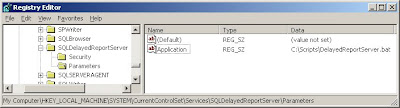
  7. Under the "Parameter" key, create a new String value named "Application". Set its value the batch file you created (C:\Scripts\DelayedReportServer.bat). You should now have something like this:
  8. Now start the Service manager (Start->Administrative tools->Services).
  9. Set the startup type of "SQL Server Reporting Service" to Manual.
  10. Make sure that the startup type of SQLDelayedReportServer is set to Automatic.
  11. Reboot and hopefully will your Report Server start without any errors. If you still get the errors, try increase the delay in "C:\Scripts\DelayedReportServer.bat".

Reference:

How To Create a User-Defined Service

tisdag 24 november 2009

Swedish SQL Server User Group

Just wanted to let you know that the Swedish SQL Server User Group (SQLUG.se) is making a comeback after hibernating for some time. Can't say I was too active the last time around but I'm planning to change that now. They're kicking it off with a meeting featuring Kalen Delaney as a speaker so it should be prove interesting enough.

fredag 20 november 2009

Office 2010 Beta

Microsoft Office 2010 is now out as a public beta. Available at: http://www.microsoft.com/office/2010/en/download-office-professional-plus/default.aspx

Enjoy

torsdag 19 november 2009

SSIS, Oracle and x64

I hope I can spare someone the time I just spent to get this working...

The scenario is as follows:
We have SSIS 2008 installed on a windows 2008 x64 server and want to connect to a Oracle database and the standard drivers doesn't work. Something with version 7.3.3 requiring another set of drivers. Anyway, here is what I did. (You don't have to download the complete 1,87 GB package)

I chose to go through ODBC.

1. Download Instant Client Package - Basic (~40Mb) from Oracle (11g) for both 32 and 64-bit.

x64 found here:
http://www.oracle.com/technology/software/tech/oci/instantclient/htdocs/winx64soft.html
and 32-bits found here:
http://www.oracle.com/technology/software/tech/oci/instantclient/htdocs/winsoft.html

2. At the same location, download Instant Client Package - ODBC (1Mb) for both 32 and 64-bits.

3. I started with the 64-bits install. Create a folder somewhere, i.e. C:\Oracle\InstantClient_64 and extract the files from the basic package (64-bit) to that folder. Extract the ODBC package (64-bit) to the same catalog. Open a commandprompt and run odbc_install. Be sure to start the prompt with administrator privileges.

4. Now we need som .ora files, sqlnet.ora and tnsnames.ora was enough for me. I copied them from another server. You will find lots of examples on the internet if you try searching google. I created a folder C:\Oracle\InstantClient_64\network\admin and placed them there.

5. Now we need to create some enviroment variables. Theese are shared between 32 and 64 bits enviroment. First add to the Path variable the directory you just created (C:\Oracle\InstantClient_64). Second create a new variable called TNS_ADMIN pointing to the location of you .ora files (C:\Oracle\instantclient_64\network\admin)

6. Run the ODBC-administrator with administrator privileges and try creating a system-dsn, it should work. The problem is that BIDS is a 32-bit application, so you can't see the 64-bits odbc sources from BIDS.

7. Create a folder somewhere, i.e. C:\Oracle\InstantClient_32 and extract the files from the basic package (32-bits) to that folder. Extract the ODBC package (32-bit) to the same catalog. Now here is the thing: open a commandprompt from C:\Windows\SysWOW64\cmd.exe and run odbc_install.exe. This installs this as a 32-bits driver.

8. Add the directory containing 32-bits package to the path variable (C:\Oracle\InstantClient_32)

9. Run 32-bits ODBC-administrator from: C:\Windows\SysWOW64\odbcad32.exe and verify that it works.

10. When you create the DSN, make sure you call them the same name in both 32 and 64 bits. Also, clear the username and make sure it's a system dsn.

11. Done.

Hope this will help someone, or me when this is long forgotten.

måndag 9 november 2009

Cisco VPN 64 bit

Cisco VPN client for 64-bit does not yet exist as far as I know. Try the Shrew client, http://www.shrew.net instead. Also, it doesn't cut your internet access.

torsdag 5 november 2009

2009 Pass Summit Day 1

So today was the day the conference started for real. The day started with opening remarks from PASS's President Wayne Snyder and was followed by a keynote by Bob Muglia and Ted Kummert of Microsoft. They talked about SQL Server in general and the upcoming 2008 R2 release in particylar.

The session then were hit and miss. Highlights include Grant Fritchey's     spotlight Best Practices for Working with Execution Plans. While not exactly a BI-related session it was packed of useful information that anyone working with SQL Server will find useful.

The other highlight was hearing Italians Marco Russo and Alberto Ferrari of SQLBI discussing their SQLBI Methodology. In short is a mix between the Inmon and Kimball approaches to data warehousing (see here or google Kimball vs Inmon for a summary). Not only was it thought provoking to hear someone not subscribing 100 % to the Kimball approach, they also managed to combine outlining the differences between Kimbal vs Inmon and describing their methodology with being absolutely hilarious at the same time.

I might write a separate post just about that.

@@Identity with ASP

T-SQL note
@@Identity should be safe to use, unless you are using triggers, if you want to retrieve the latest ídentity value in a table.

Insert into myTable (Col1) Values('hello')
Select @@Identity

I know the @@identity is global within the connection, but it should be safe to use unless you are using triggers. When running from a ASP web application, there seem to be some connection pooling that makes this fail, or rather return the wrong ID. So if two concurrent users are calling the same procedure through an ASP application they might get each others id's.

Solution is as simple as the example: just use scope_identity() function instead or the output variable available in SQL2005 and later.

2009 Pass Summit Day 0 - Pre conference seminars

The pre-conference seminars were titled Delivering BI to the Masses. Maybe not too much of the material was that new to me the great speaker Peter Myers still made it worthwhile.

In the evening we were treated to a tour of the Microsoft Campus by Swedish developer Tobias Ternström and a very nice dinner at Elliot's. Courtesy of Microsoft Sweden. Thanks guys!

(BTW I just realised that you could publish blog post from Word 2007. This is really going to improve my English spelling and grammar)

2009 Pass Summit

So I and two of my esteemed colleagues are in Seattle for the PASS Summit this year. None of us had been before so we were really excited.

First I must say that Seattle is a really great city. We came here on Sunday before the conference, to attend a pre-conference session on Monday. Weather was lovely with the sun shining most of the time with hardly any rain at all. Great food too.

I will try to do a write up of each day. But there will be latency – I won't promise live blogging.

fredag 30 oktober 2009

Windows mobile 6.5 for HTC Touch Diamond

Just now upgrading my HTC Touch Diamond 2 to Windows Mobile 6.5 downloaded from HTC homepage, released 2009-10-27.

Make sure you have a backup or your files on the memory stick.

I am running Vista on 64 bit, all you had to do was start the Windows Mobile Device Center and make sure the phone was connected. Download the setup from HTC and execute. The whole process took about 5 minutes (except downloading the setup).

First startup took some time, more or less just about the time as the upgrade... And then some wizards and done!

No problems what so ever, amazing...

torsdag 29 oktober 2009

Trying out new stuff: Yammer

As a part of the dev team at Business Vision you get to be a guinea pig for new services and software. I've been thinking a while about using twitter for internal communications instead of email.
However, some colleagues might not like the thought of everything they write being open for anyone to read, so I've entertained the thought of using some kind of internal twitter-service. I even considered writing a sharepoint web part.
Luckily I shared my plans with a co worker and he suggested using Yammer. That turned out to be really fortunate as I think Yammer is great. It has a great lightweight web UI and an optional desktop client. It keeps the simplicity of twitter while adding a few functions catering to more enterprisey users. For example the ability to create groups that you can restrict your messages (yams?) to.
The dev team is testing it right now. We will probably invite more people to join over the next few days so it's gonna be exciting to see how it is received.
(Pictured to the right is the Yammer desktop client)

onsdag 28 oktober 2009

Presenting the dev team: Dan Sydner

Before we begin, please let me introduce myself. My name is Dan Sydner and I've been at Business Vision for the last 5 years. Before that I studied computer science at KTH.

I spend my time at work doing consulting on the various BI tools Microsoft provides. Everything from handcoding (hardcoding?) SQL to SSRS SSAS and SSIS. I also do in house programming in C#, mostly maintaining our report delivery platform, Vision Reporter Web.


And last but not least I'm the editor of this blog! Trying to keep the other guys, Kalle and Richard in line.

Excel 2010 - What is new?

I have now been using Office 2010 CTP since the beginning of August and it's now time to give my view on Excel 2010 from a Business Intelligence point of view.

So, what's new? Not much actually, it feels more or less like Excel 2007 except the blue color. It feels more like a service pack or something. They have fixed many things that felt strange in Excel 2007. So the overall judgement is that Excel 2010 is a little bit better in general.

The two major changes that I think is of importance to Business Intelligence users is: Pivot Slicers and Sparklines.

Pivot Slicers
This is nothing but a flat pivot filter but with some intelligence. Instead of drilling down in a tree view, you can now filter from a more intuitive user interface. The main thing however, is that the slicer knows the choices in the filter that contains information.

The typical scenario is when using the time dimension on the current year. The month or quarters that hasn't happened yet, are greyed out. In the example below, there is no male with 5 children that has 0-1 cars in the underlying data set. This works with cubes, tables and PowerPivot (Gemini).

Sparklines


Sparklines is a nice feature, a small diagram in a cell. You can quickly get a feeling for historical data. I can't say it's a revolution but a nice feature. This will also be available in reporting services 2008 R2.

That's it... The big revolution was Excel 2007, now it's just a little bit better in general.

fredag 23 oktober 2009

Gemini - PowerPivot


Right now listening to Donald Farmer about PowerPivot.

He just showed.how to import a 4 000 000 rows from sql server. Really no magic going on, if you are on a slow network 1 000 000 000 rows will take a loooong time.

Also, since powerpivot is a column based store, datamining wont be available at this point. That ruins the data compression.

You will be able to add additional meta data such as calculated nembers and measures. Many functions, mdx-like, like a lot of time functions. So you can more or less skip olap...

The coolest thing though, is that you can import data from multiple sources, ie sap and the web and define relationships between theese sources.

Last post from sharepoint conference 2009

Final note from the airport in las vegas. The grand finale was at LAX at Luxor, real good clubbing.

In total, a very good conference, but not that many news. Last years bi conference in seattle contained most of the stuff here, but this time it seemed to work...

Over and out

Skickat från min HTC Touch Diamond2